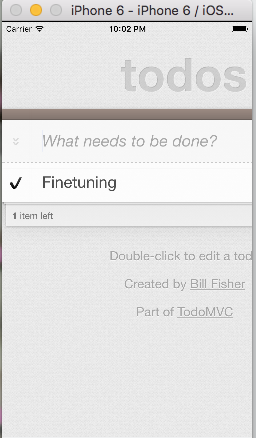
By choosing for Cordova as an App container, most developers aim to build an app that should run on the iOS and Android platform from one codebase. In the last post I demonstrated how to embed a javascript React App in Cordova on the Android platform, now I will do so for iOS (on a Mac).
A quick recap to make this work (repeating steps from former posts):
$cd $HOME/tmp

$mkdir blogpost

$cd blogpost

$git clone https://github.com/facebook/flux.git

$cd flux/examples/flux-todomvc

$npm install
#lots of installing here
In Part1 and Part2 (Android version) I used the ’npm start’ command to create the concatenated javascript file bundle.js that is referenced in the index.html. Let’s use the alternative build command to create a minified version of the javascript bundle (more efficient because it deletes newlines, tabs and spaces).
$npm run build
Then for ol’ times sake, let’s use perl to replace the javascript bundle mentioned in index.html, as it defaults to the non-minified version (bundle.js), let’s use the minified version. (Afterwards, you can verify it all works by opening index.html in your browser from the filesystem).
$perl -p -i -e 's/bundle.js/bundle.min.js/g' index.html
Same as before, to embed the React app in a Cordova container, you need Cordova installed, a crossplatform app container.
Install it with:
$npm install -g cordova
Let’s make an empty cordova application
$cd $HOME/tmp/blogpost

$cordova create todomvcios nl.joustie.todomvcios "TodoMVCiOS"

$cp -R flux/examples/flux-todomvc/* todomvcios/www/

$cd todomvcios/www
Now it’s time to add iOS support (this copies the built app and packages it for iOS)
$cordova platform add ios
Then create a build which we can run in the simulator.
$cordova build ios
We now can run the result in the iOS simulator:
$cordova run ios --emulate